Kiddopia - Kids Learning Games
- 4.3
- Rating
- 5.00M
- Installs
- Free
- Price
 Analysis by App-foxy
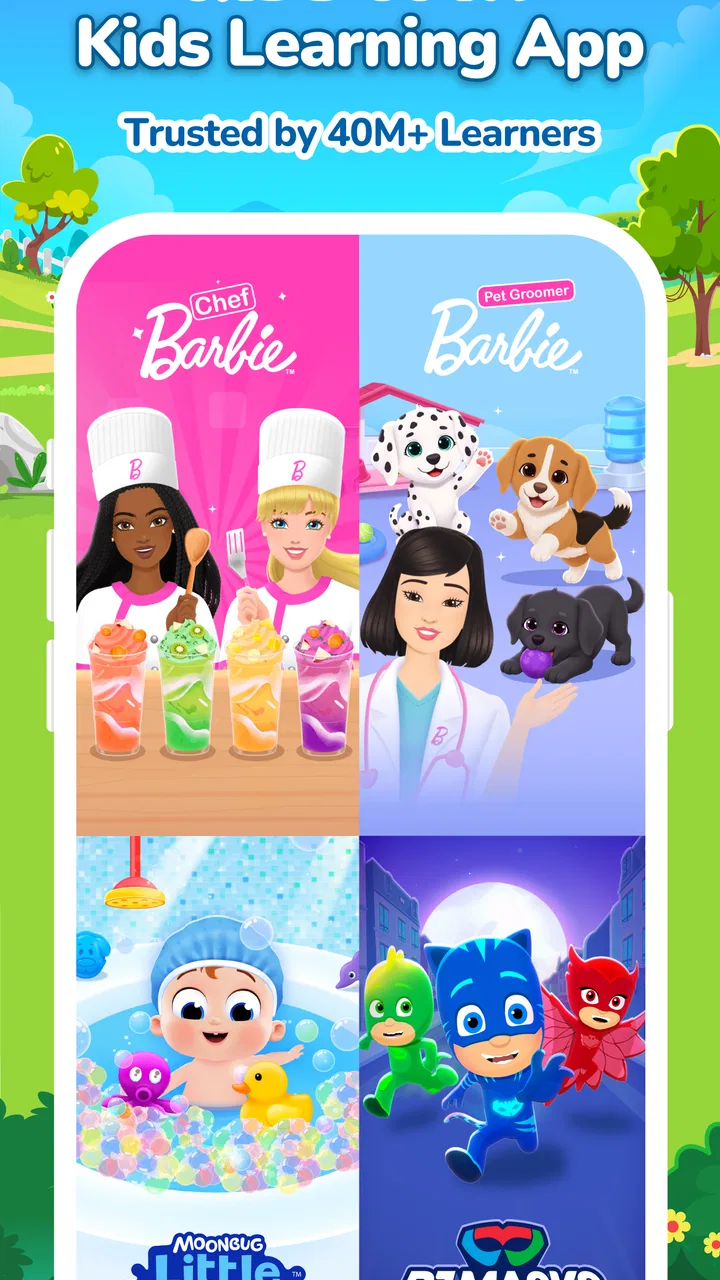
I came away from Kiddopia - Kids Learning Games thinking of it less as one lesson app and more as a colorful activity shelf for young children. It brings together learning experiences connected with familiar characters such as Barbie, Baby John, the PJ Masks, and Pocoyo, while keeping the interaction playful rather than classroom-like. That makes it easy to offer a child something constructive during a quiet moment, but it also means parents need to guide the experience if they want a clear learning routine instead of open-ended tapping.
I reviewed it as an education app from Kiddopia Inc., and its biggest strength is the way it lowers the resistance many children feel toward formal practice. A child who refuses a worksheet may be willing to explore a character-led activity. At the same time, I would not treat it as a complete replacement for reading together, hands-on play, schoolwork, or conversation. It works best as one part of a child’s day, especially when an adult helps choose an appropriate activity and notices what the child is actually learning.
Getting started without turning setup into a struggle
The first useful check is compatibility. The app supports Android 8.0 and later, so I would confirm the operating system before trying to troubleshoot installation or launch problems. Kiddopia is free to install, and it is marked for Everyone, which makes it approachable for family devices. However, free installation should not be confused with unlimited access at no cost: in-app purchases range from $0.99 to $99.99 per item, so I would review purchase controls before handing the device to a child.
You May Also Like

 Blood Strike: 2.5 Anniversary
Blood Strike’s Loadouts Turn Every Drop Into a Tactical Gamble
A close look at Blood Strike’s custom loadouts: how fast access to signature weapons reshapes its battle royale rhythm, rewards preparation, and narrows the gap between fights.

 Pandora - Music & Podcasts
Pandora’s Music Is Easy to Start, but Harder to Recover
Pandora’s strength is its low-effort path from a seed to a station. Its weak spot is how much confidence it asks you to place in connection, setup, and quiet recovery.

 8 Ball Pool
 Is Built on Rivalries, Rematches, and Routine
A close look at the rivalries, rematches, shared routines, and unanswered safety questions that turn a quick pool match into a persistent mobile community.

 Samsung Music
’s Quiet Strength Is Playing What You Already Own
Its reach comes less from spectacle than from dependable access to a personal library. That simplicity is both the app’s strongest retention engine and its ceiling.

 AccuWeather: Weather Radar
AccuWeather Review: A Quick, Clear Forecast for Everyday Decisions
For everyday plans, the best forecast is the one you can understand quickly. AccuWeather makes rain timing, radar, and local conditions easy to act on, with a few trade-offs.

 Hill Climb Racing
Why Hill Climb Racing Still Turns Crashes Into One More Run
A tiny car, a bumpy hill and one more upgrade: Hill Climb Racing keeps resurfacing because its simple chaos makes every near-miss feel personal.
More From Our News Desk



That preparation matters because children are quick to associate a delayed screen with a broken game. I prefer to install it myself, open it once, and check that the main areas respond normally before inviting a child to use it. This simple trial also gives me a chance to see whether the device has enough free storage and whether the current app version is already installed. The current version is 26.02.16, and keeping the app updated is a sensible first step when something behaves unexpectedly.
Parents often get stuck at the point where a child expects every visible activity to open immediately. A character-filled interface can make the whole catalog look equally available, even when access may depend on the account or purchase state. I would avoid promising a particular activity before checking it myself. That small change in wording prevents a frustrating situation in which the child feels that an adult has taken something away.
Another practical issue is the difference between a child’s ability and a child’s willingness to navigate. Younger users may understand the activity but not the back button, selection screen, or transition between areas. I found that a short demonstration works better than repeated instructions: show how to enter an activity, how to leave it, and where to return when the screen feels confusing. Once that route is familiar, the child can spend more time learning and less time asking for help.
I would also choose the first session carefully. A busy household, a nearly empty battery, or an unstable connection can make the app appear unreliable even when the real problem is the surrounding situation. A short, calm trial is more informative than introducing it five minutes before leaving the house. If the first experience is smooth, the child is more likely to accept the app as a useful routine rather than demanding it only as emergency entertainment.
Where children and adults commonly get stuck
The most common friction is not necessarily a crash. It is a mismatch between what the adult expects and what the child sees. Adults may look for a neat sequence of lessons, while the child sees a collection of attractive activities. Kiddopia’s character-based presentation is excellent for inviting exploration, but it does not automatically create a personalized study plan. If your priority is a tightly ordered curriculum with visible progress targets, a dedicated subject app may be easier to manage.
Children can also become stuck when they repeat a favorite activity and avoid less familiar ones. I do not see that as a failure of the app; repetition can be useful, especially for early learners. Still, I would occasionally suggest a neighboring activity instead of taking control of the device. For example, after a child finishes a familiar number-focused task, ask whether they want to try something involving shapes, letters, or problem solving. The aim is to broaden the session without making it feel like a test.
A further sticking point is attention span. The presence of well-known characters can hold interest, but it cannot guarantee that a child will finish every activity. If the child starts wandering away from the screen, I would stop rather than push for completion. Ten focused minutes can be more valuable than a long session in which the child taps without thinking. This is one reason I see the app as a flexible supplement rather than a timer-based academic program.
Checks that solve many setup problems
When the app will not open properly, I start with ordinary checks rather than assuming the content is at fault. I close it fully, reopen it, and make sure the device is not overloaded with other active apps. I also check the internet connection if a screen seems unable to load, then try again after moving to a more reliable connection. These steps are basic, but they separate a temporary device problem from an issue with the app itself.
If installation fails, I check the operating system requirement, available storage, and whether the device is using the correct store account. I would not repeatedly tap install while the device is low on space, because that can create more confusion without changing the underlying problem. Freeing a little room, restarting the device, and trying a clean installation is a more sensible sequence.
Purchase-related confusion deserves special care. Since the app includes optional purchases, I would make sure the adult responsible for the device understands which account handles them and that a child cannot accidentally approve a transaction. I would also explain access in child-friendly language: some experiences may be available now, while others may require an adult decision. This is clearer than describing everything as “free” and correcting the misunderstanding later.
If sound is missing, I check the device volume, silent mode, connected headphones, and whether another app is currently controlling audio. If the screen appears frozen, I wait briefly before tapping repeatedly, then restart the app if needed. Repeated taps can sometimes make a delayed response harder to understand. These are general device checks, but they are especially useful with children because a small delay can quickly become a dramatic complaint that “nothing works.”
I also recommend testing the app with the same device conditions the child will normally use. A tablet shared by several family members may have different profiles, storage levels, or audio settings throughout the day. If an activity works for one person but not another, I compare those conditions before blaming the learning content. That habit saves time and gives the child a more consistent experience.
Recovering a session when something goes wrong
When an activity stops responding, my recovery workflow is deliberately simple. I first note what the child was doing, close and reopen the app, and return to the same area. If the problem repeats, I restart the device and test a different activity. This comparison is useful: if another activity works, the problem may be limited to that moment or section; if the whole app struggles, the device or connection deserves more attention.
I avoid immediately deleting the app because that can create a second problem if the family is unsure how access or purchases are connected to the device account. Reinstallation can be a reasonable later step, but I treat it as a last resort after restarting, checking storage, and confirming the operating system. Before taking that step, I would make sure the adult knows the relevant account details and can restore the intended setup.
A child-friendly recovery plan helps too. I tell the child that we will try one quick fix, then choose another activity if the first one still does not open. This prevents the entire session from becoming a technical support event. It also teaches a useful habit: when one tool fails, learning does not have to stop. Kiddopia’s broad activity style makes that switch more natural than it would be in an app built around one single exercise.
There is a useful distinction between losing the flow and losing the learning goal. If a child was practicing recognition, counting, or following instructions, I can continue that idea away from the screen while the app is being restarted. We might count objects nearby, identify letters on packaging, or describe a character’s actions. I would not claim that the app replaces these activities; rather, its themes can provide a starting point for extending learning into ordinary life.
For recurring problems, I would record the exact sequence: device model, operating system, activity selected, connection state, and what happened on screen. That is far more helpful than saying only that the app is broken. It also prevents a parent from repeatedly trying random fixes. If the same failure follows the same steps after basic checks, contacting Kiddopia Inc. through the appropriate official support route is more productive than continuing to reset the device.
When the app is not the cause
Some disappointing sessions are caused by expectations, not software. A child may be tired, hungry, overstimulated, or simply finished with screens for the day. The familiar characters can attract attention, but they cannot make every moment suitable for digital learning. I would offer the app when the child is reasonably ready to focus, not as a solution for every difficult mood.
The device itself can also distort the experience. A small phone screen may make tapping uncomfortable for a young child, while a tablet passed between siblings can introduce interruptions and arguments. Headphones may improve concentration in a noisy room, but they can also make it harder for an adult to notice audio problems or hear what the child is saying. I prefer a setup where the child can interact independently while an adult remains close enough to observe.
It is also worth considering whether the learning goal matches the app. Kiddopia is a good fit when you want playful exposure and practice across several early-learning areas. It is less suitable when you need formal assessment, detailed teacher reporting, advanced subject instruction, or a strict lesson order. In those cases, a school platform, workbook, or specialized literacy and mathematics app may offer clearer evidence of progress.
Compared with passive video, the app has the advantage of asking the child to respond rather than only watch. Compared with physical books and puzzles, it offers faster variety and a more animated presentation, but it cannot provide the same tactile experience or shared conversation unless an adult joins in. Compared with a narrowly focused educational app, it is broader and easier to use for changing interests, yet potentially less precise for mastering one defined skill.
That trade-off is important for families choosing between alternatives. If your child needs a quick activity after school and enjoys recognizable characters, the variety is a real benefit. If your child becomes distracted by visual rewards or needs a calm, minimal interface, a simpler app may be better. I would judge it by the child’s response: are they making choices, listening, recognizing patterns, and explaining what they did, or merely tapping until something changes?
Everyday ways I would use it
One realistic use is a short transition after school. I would let the child choose an activity while I prepare a snack, then sit nearby for the final few minutes and ask what they discovered. That makes the app a bridge between school and home rather than an isolated screen habit. I would keep the session bounded by the family’s routine, not by a promise that the child must complete a particular number of activities.
Another useful workflow is to pair one digital activity with one offline follow-up. After a child explores counting, we might count spoons while setting the table. After a language-focused activity, I might ask the child to find objects beginning with a particular sound. The important insight is that the app becomes more educational when its ideas leave the screen. Without that follow-up, the child may remember the character but not the underlying concept.
I would also use it selectively during travel or waiting periods, after testing the device beforehand. A child can become upset if an expected activity is unavailable at the exact moment it is needed, so I would not rely on it as the only travel plan. Bring a book, drawing materials, or a simple conversation game as well. Kiddopia is most dependable as one option among several, not as a guarantee that every waiting period will be effortless.
For siblings, I would avoid assuming that one shared session will suit everyone. Different ages may need different levels of help, and a younger child may tap through an activity while an older child wants more independence. Taking turns or giving each child a separate short choice can reduce conflict. If the device supports the family’s normal user setup, I would keep those arrangements consistent instead of changing them every session.
Parents can learn more by watching the child’s decisions than by asking whether they “liked” the app. Notice whether the child recognizes an instruction, retries after an error, asks for help, or explains an answer. Those observations reveal more than screen time alone. They can also show when the child has outgrown a particular activity or needs a different kind of support.
Who should choose it, and who should skip it?
I recommend Kiddopia for families seeking a friendly collection of early-learning activities with recognizable characters and an easy entry point. It is especially appealing for children who respond to stories, animation, and choice. The four-point average from around sixteen thousand ratings, along with more than five million installs, suggests that it has reached a substantial audience, though popularity should not replace checking whether its style suits your child.
I would be more cautious if your main goal is measurable academic progression. The app’s broad, playful approach may feel too loose for a parent who wants a daily sequence, detailed records, or one clearly defined subject. I would also hesitate for a child who becomes overly absorbed in character-driven screens or has difficulty moving from digital play to another activity. In that case, physical materials or a quieter learning app may produce a better routine.
The age label is Everyone, but that does not mean every activity will be equally appropriate for every child’s ability. A preschooler and an early elementary learner can need different levels of explanation, patience, and supervision. I would begin together, identify what feels easy or confusing, and then decide whether the child can use it independently. Independence should be earned through understanding the navigation, not assumed because the interface looks bright and simple.
Finally, remember that the free price makes trying it straightforward, while the optional purchase range makes adult oversight important. I would install it for the child only after deciding how the family handles purchases and access. That small bit of planning removes one of the most avoidable sources of tension.
My practical verdict
I like Kiddopia as a flexible learning companion, not as a complete education system. Its character-led activities can turn a reluctant moment into genuine participation, and its variety helps families adapt to changing interests. The best results come when an adult chooses a sensible starting point, checks the device, keeps sessions manageable, and connects the on-screen idea with something in the child’s real world.
My strongest advice is to treat setup and recovery as part of the experience. Confirm the operating system, test the app before a child needs it, understand the purchase boundaries, and use a simple restart-and-compare workflow when an activity misbehaves. If the problem continues across the whole app, investigate the device or connection rather than assuming the educational content is responsible.
For a family wanting playful variety, I think the free installation is worth exploring. For a family needing formal structure or deep instruction in one subject, I would choose a more specialized alternative and use Kiddopia only as a supplement. In my experience, its real value appears when it opens a conversation, encourages a child to try, and then leads naturally to learning away from the screen.
FAQs for Kiddopia - Kids Learning Games
01What age group is Kiddopia suitable for?
Kiddopia is designed for children aged 2 to 7 years old. It offers a range of educational games and activities that cater to preschool and early elementary school levels, ensuring that content is age-appropriate and engaging for young learners.
02Does Kiddopia require an internet connection to play?
Kiddopia primarily functions offline, allowing children to enjoy educational games without an active internet connection. However, certain features, updates, or additional content may require online access to download or update the app’s resources.
03Are there in-app purchases or ads in Kiddopia?
Kiddopia is ad-free, providing a safe environment for children. While the app may offer a free trial, it typically requires a subscription for full access. Parents should be aware of any subscription options and ensure they have set up appropriate purchase controls on their devices.
04What educational content does Kiddopia offer?
Kiddopia covers a wide range of educational topics including math, language arts, creativity, and social-emotional learning. Its interactive games and activities are designed to teach essential skills like counting, vocabulary, and problem-solving in a fun and engaging manner.
05Is Kiddopia available on both Android and iOS?
Yes, Kiddopia is available for download on both Android and iOS platforms. Users can find the app on the Google Play Store and Apple App Store, ensuring accessibility for most smartphone and tablet devices. Make sure your device meets the app's system requirements for optimal performance.
Pros
- Engaging graphics keep kids entertained.
- Wide variety of educational topics covered.
- User-friendly interface for young children.
- Regular updates with new content.
- No ads ensure a safe environment.
Cons
- Subscription required for full access.
- Limited offline functionality.
- Some games may be too easy for older kids.
- Can be repetitive over time.
- Requires parental setup and supervision.

Kiddopia - Kids Learning Games
Gallery